
Live Mode
Mar 16, 2025 | by Maximilian Kaske | [engineering]

This article is part of the logs.run series.
You can enable the live mode right away via logs.run/i?live=true.
Note that it's a demo. The data is mocked and not persisted. Live mode might take a while to load new data.
While TanStack provides excellent documentation on Infinite Queries, this article offers an additional practical example focusing on implementing a live data update.
Basic Concept
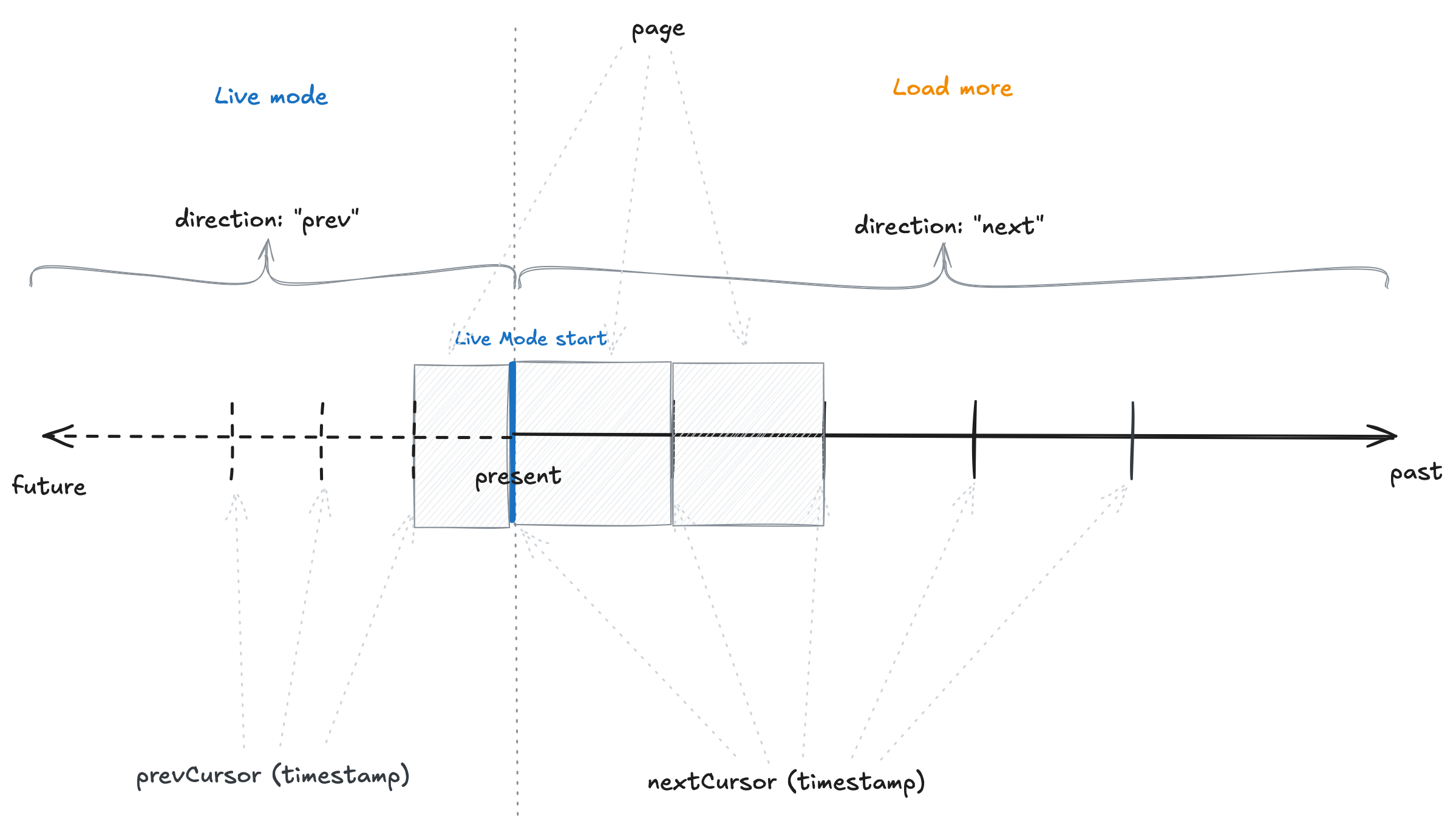
Infinite queries work with "pages" of data. Each time you load new data, a new "page" is either appended (load more older data) or prepended (live mode newer data) to the data.pages array defined by the useInfiniteQuery hook. In the documentation, you'll read lastPage and firstPage to refer to the last and first page respectively.
Each query to our API endpoint requires two key parameters:
- A
cursor- a pointer indicating a position in the dataset - A
direction- specifying whether to fetch data before or after the cursor ("prev" or "next")
A timeline sketch of the infinite query behavior:
- The
nextCursoris the timestamp of the last item of the page. The "next" page will only fetch items that are older than thenextCursor. - The
prevCursoris the timestamp of the first item of the page (or the current timestamp). The "prev" page will only fetch items that are newer than theprevCursor.
API Endpoint
Your API endpoint should return at minimum:
type ReturnType<T> = {
  // The single "page" data to be rendered
  data: T[];
  // The timestamp to be used for the next page on _load more_
  nextCursor?: number | null;
  // The timestamp to be used for the previous page on _live mode_
  prevCursor?: number | null;
};
When fetching older pages ("next" direction), we set a LIMIT clause (e.g., 40 items). However, when fetching newer data ("prev" direction), we return all data between the prevCursor and Date.now().
Let's take a look at an example implementation of the API endpoint:
// import ...

type TData = {
  id: string;
  timestamp: number;
  // ...
};

export async function GET(req: NextRequest) {
  const searchParams = request.nextUrl.searchParams;
  const cursor = searchParams.get("cursor");
  const direction = searchParams.get("direction");

  // Live mode
  if (direction === "prev") {
    const prevCursor = Date.now();
    const data = await sql`
      SELECT * FROM table
      WHERE timestamp > ${cursor} AND timestamp <= ${prevCursor}
      ORDER BY timestamp DESC
    `;
    const res: ReturnType<TData> = { data, prevCursor, nextCursor: null };
    return Response.json(res);
    // Load more
  } else {
    const data = await sql`
      SELECT * FROM table
      WHERE timestamp < ${cursor}
      ORDER BY timestamp DESC
      LIMIT 40
    `;
    const nextCursor = data.length > 0 ? data[data.length - 1].timestamp : null;
    const res: ReturnType<TData> = { data, nextCursor, prevCursor: null };
    return Response.json(res);
  }
}
Key points:
- Live mode ("prev" direction): Returns all new data between
Date.now()and thecursorfrom the first page - Load more ("next" direction): Returns 40 items before the
cursorof the last page and updatesnextCursor
Important: Be careful with timestamp boundaries. If items share the same timestamp, you might miss data because of the
>comparison. To prevent data loss, include all items sharing the same timestamp as the last item in your query.
Avoid Using OFFSET with Frequent Data Updates in Non-Live Mode
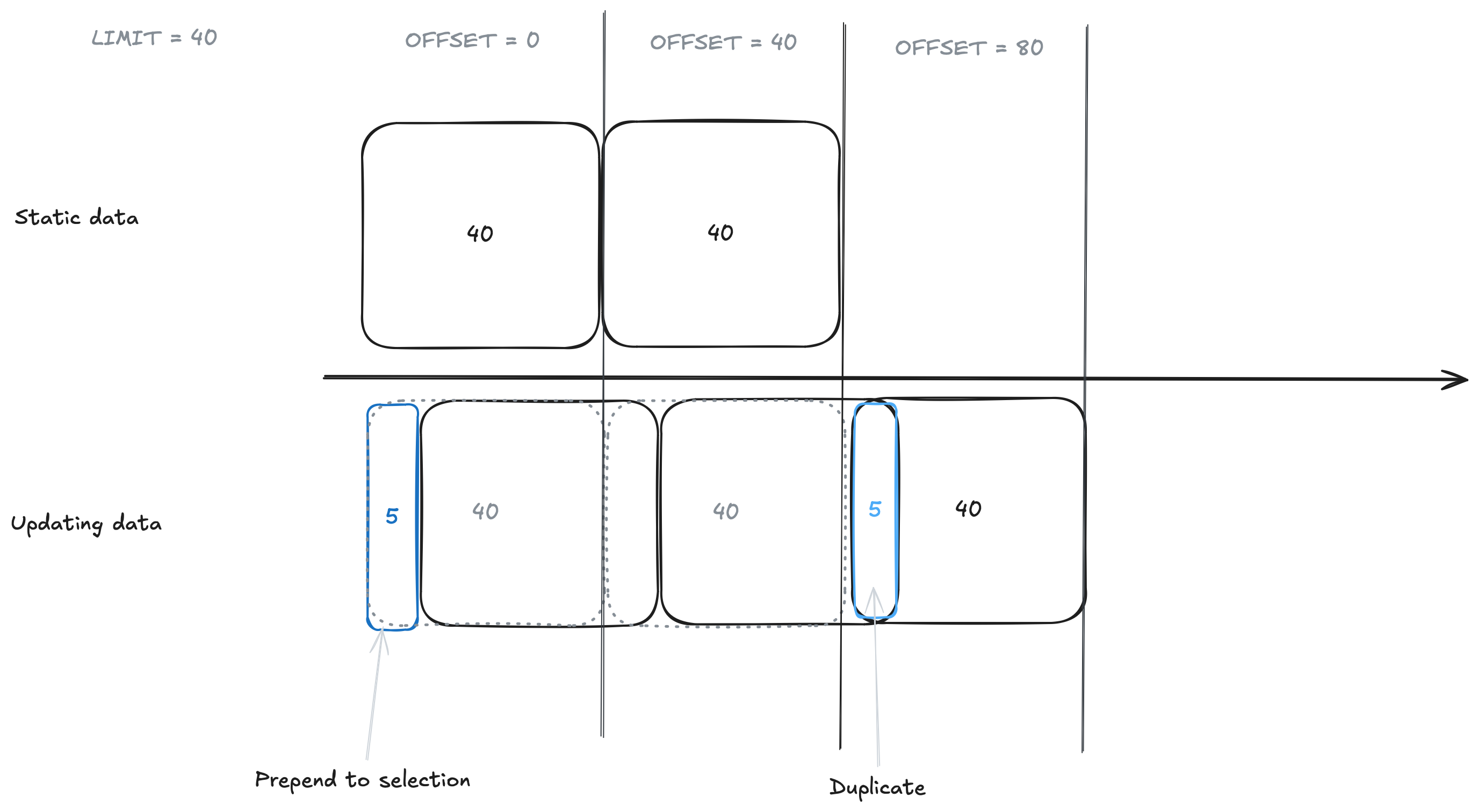
While it might be tempting to use the cursor as an OFFSET for pagination (e.g. ?cursor=1, ?cursor=2, ...), the following approach can cause problems when data is frequently prepended:
const limit = 40;
const offset = limit * cursor;

const data = await sql`
  SELECT * FROM table
  ORDER BY timestamp DESC
  LIMIT ${limit}
  OFFSET ${offset}
`;
When new items are prepended, they shift the offset values, causing duplicate items in subsequent queries.
Client Implementation
Let's call our API endpoint from the client and use the dedicated infinite query functions that are added to the useQuery hook.
"use client";

import React from "react";
import { useInfiniteQuery } from "@tanstack/react-query";

const dataOptions = {
  queryKey: [
    "my-key",
    // any other keys, e.g. for search params filters
  ],
  queryFn: async ({ pageParam }) => {
    const { cursor, direction } = pageParam;
    const res = await fetch(
      `/api/get/data?cursor=${cursor}&direction=${direction}`,
    );
    const json = await res.json();
    // For direction "next": { data: [...], nextCursor: 1741526294, prevCursor: null }
    // For direction "prev": { data: [...], nextCursor: null, prevCursor: 1741526295 }
    return json as ReturnType;
  },
  // Initialize with current timestamp and get the most recent data in the past
  initialPageParam: { cursor: new Date().getTime(), direction: "next" },
	// Function to fetch newer data
  getPreviousPageParam: (firstPage, allPages) => {
    if (!firstPage.prevCursor) return null;
    return { cursor: firstPage.prevCursor, direction: "prev" };
  },
	// Function to fetch older data
  getNextPageParam: (lastPage, allPages) => {
    if (!lastPage.nextCursor) return null;
    return { cursor: lastPage.nextCursor, direction: "next" };
  },
};

export function Component() {
  const { data, fetchNextPage, fetchPreviousPage } = useInfiniteQuery(dataOptions);

  const flatData = React.useMemo(
    () => data?.pages?.flatMap((page) => page.data ?? []) ?? [],
    [data?.pages],
  );

  return <div>{flatData.map((item) => {/* render item */})}</div>;
}
The getPreviousPageParam and getNextPageParam functions receive the first and last pages respectively as their first parameter. This allows us to access the return values from the API, prevCursor and nextCursor and to track our position of the cursor in the dataset.
TanStack provides helpful states like isFetchingNextPage and isFetchingPreviousPage for loading indicators, as well as hasNextPage and hasPreviousPage to check for available pages - especially useful for as we can hit the end of the load more values. Check out the useInfiniteQuery docs for more details.
Both fetchNextPage and fetchPreviousPage can run independently and in parallel. TanStack Query manages appending and prepending pages to the data.pages array accordingly.
Implementing Auto-Refresh
While TanStack Query provides a refetchInterval option, it would refetch all pages, growing increasingly expensive as more pages are loaded. Additionally, it doesn't reflect the purpose of live mode as instead of refreshing the data, we want to fetch newer data.
Therefore, we implement a custom refresh mechanism for fetching only new data that you can add to any client component. Here's an simple example implementation of the LiveModeButton:
"use client";

import * as React from "react";
import type { FetchPreviousPageOptions } from "@tanstack/react-query";

const REFRESH_INTERVAL = 5_000; // 5 seconds

interface LiveModeButtonProps {
	fetchPreviousPage?: (
		options?: FetchPreviousPageOptions | undefined,
	) => Promise<unknown>;
}

export function LiveModeButton({ fetchPreviousPage }: LiveModeButtonProps) {
	// or nuqs [isLive, setIsLive] = useQueryState("live", parseAsBoolean)
	const [isLive, setIsLive] = React.useState(false);

	React.useEffect(() => {
		let timeoutId: NodeJS.Timeout;

		async function fetchData() {
			if (isLive) {
				await fetchPreviousPage();
				// schedule the next fetch after REFRESH_INTERVAL
				// once the current fetch completes
				timeoutId = setTimeout(fetchData, REFRESH_INTERVAL);
			} else {
				clearTimeout(timeoutId);
			}
		}
		fetchData();

		return () => clearTimeout(timeoutId);
	}, [isLive, fetchPreviousPage]);

	return <button onClick={() => setIsLive(!isLive)}>
		{isLive ? "Stop live mode" : "Start live mode"}
	</button>
}
We use setTimeout with recursion rather than setInterval to ensure each refresh only starts after the previous one completes. This prevents multiple simultaneous fetches when network latency exceeds the refresh interval and is a better UX.
Go check it out on logs.run/i?live=true.
For more details about our data table implementation, check out The React data-table I always wanted blog post.