
We built incident management for openstatus (because Slack threads suck)
Oct 15, 2026 | by Thibault Le Ouay Ducasse | [engineering]

At the end of last year, we said we wanted to move openstatus upstream.
Until now, we did two things: tell you when something broke (monitors) and tell your users about it (status pages). Everything in between happened in a messy Slack thread.
Today we're shipping incident management.
Why?
Most incident tools (incident.io, Rootly, PagerDuty) are great, but they're built for enterprise teams with 500 engineers. You ask for a place to track an outage and you get a full-blown SaaS: 14 severity levels, sub-roles, Jira sync rules, and config screens nobody asked for.
We don't need all that. It's just Max and me. We wanted something small and opinionated that works for a 2-person startup the same way it works for a 10-person engineering team.
Before this, we were just using #general. And honestly, it sucked.
When an alert hits, say GCP queue depth spikes, dumping a message into #general and debugging inside a Slack thread falls apart fast:
- Slack's thread UX is awful when shit hits the fan. Half the replies are hidden behind "43 more replies", someone pastes logs while someone else asks if we should update the status page, and nobody ticks "Also send to channel."
- Nobody knows if the issue is still happening, mitigated, or actually fixed.
- Two weeks later, when a customer or an auditor asks what happened on Tuesday at 10:14 AM, you're scrolling through
#generaltrying to piece a timeline together.
How it works
We kept the workflow as small as possible:
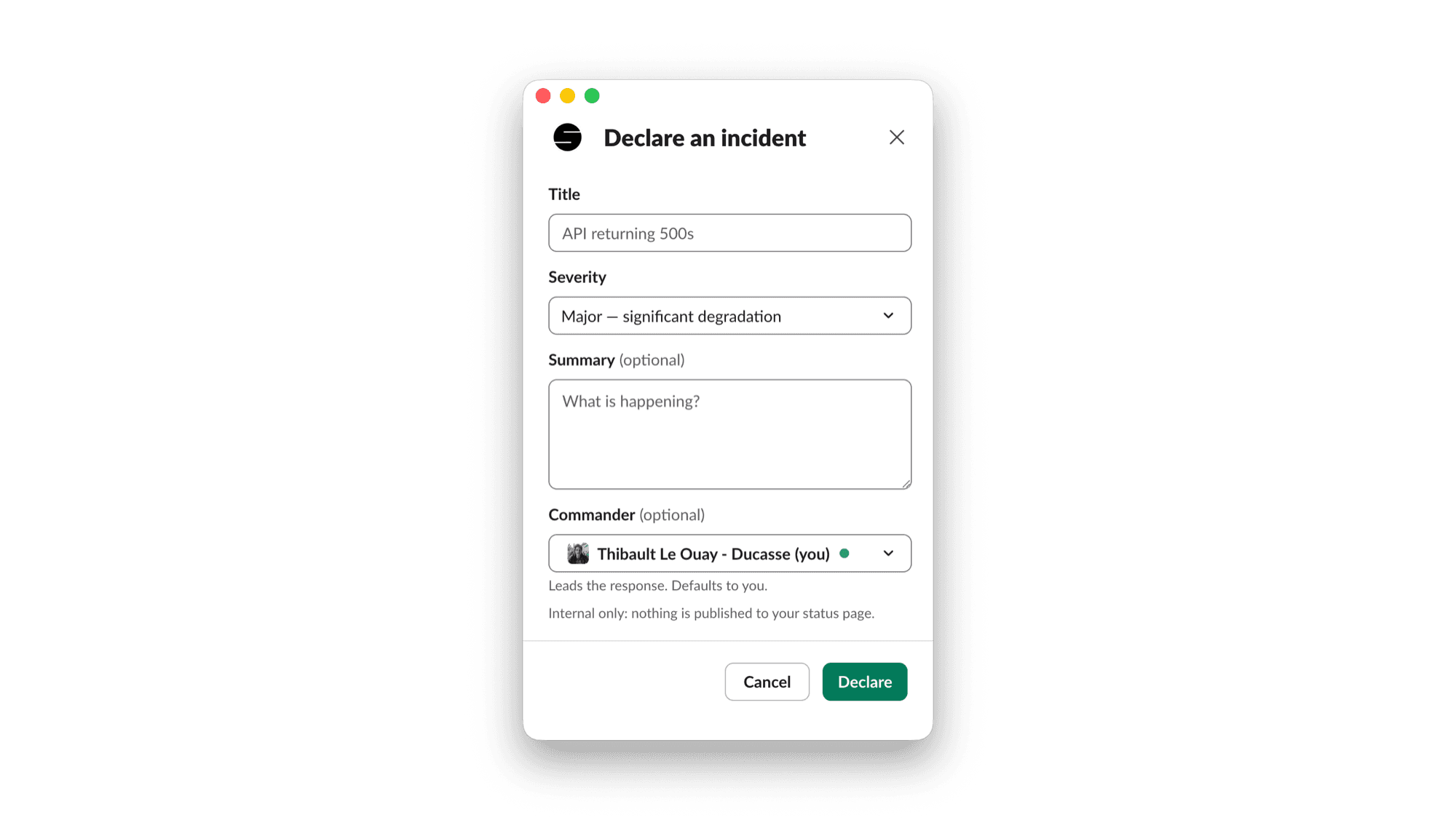
- You declare an incident from Slack or from the openstatus dashboard.
- openstatus creates a dedicated channel:
#inc-2026-10-14-gcp-queue. - Everyone jumps in, debugging stays in one room, and the channel gets archived when you close the incident.
I was wrong about slash commands
When we built our Slack agent in February, I wrote:
The only slash command I remember is the gif one.
I was half wrong. Natural language is great when you want the agent to draft prose for your status page. It's terrible when production is down and you just want to open a room in two seconds.
So we added /openstatus incident:
/openstatus incident declare GCP queue spike --sev critical
/openstatus incident note Draining stuck workers in europe-west1
/openstatus incident mitigate Queue depth dropping after worker restart
/openstatus incident resolve
/openstatus incident postmortem
You don't have to pass incident IDs inside the channel. We bind the Slack channel ID to the incident row, so the bot already knows where it is. You can also declare an incident straight from any Slack message's ⋯ menu (like when someone posts "is the API timing out for anyone else?").
Pinning messages to the timeline (📌 or right-click)
Nobody stops in the middle of debugging to open a dashboard and write timeline notes.
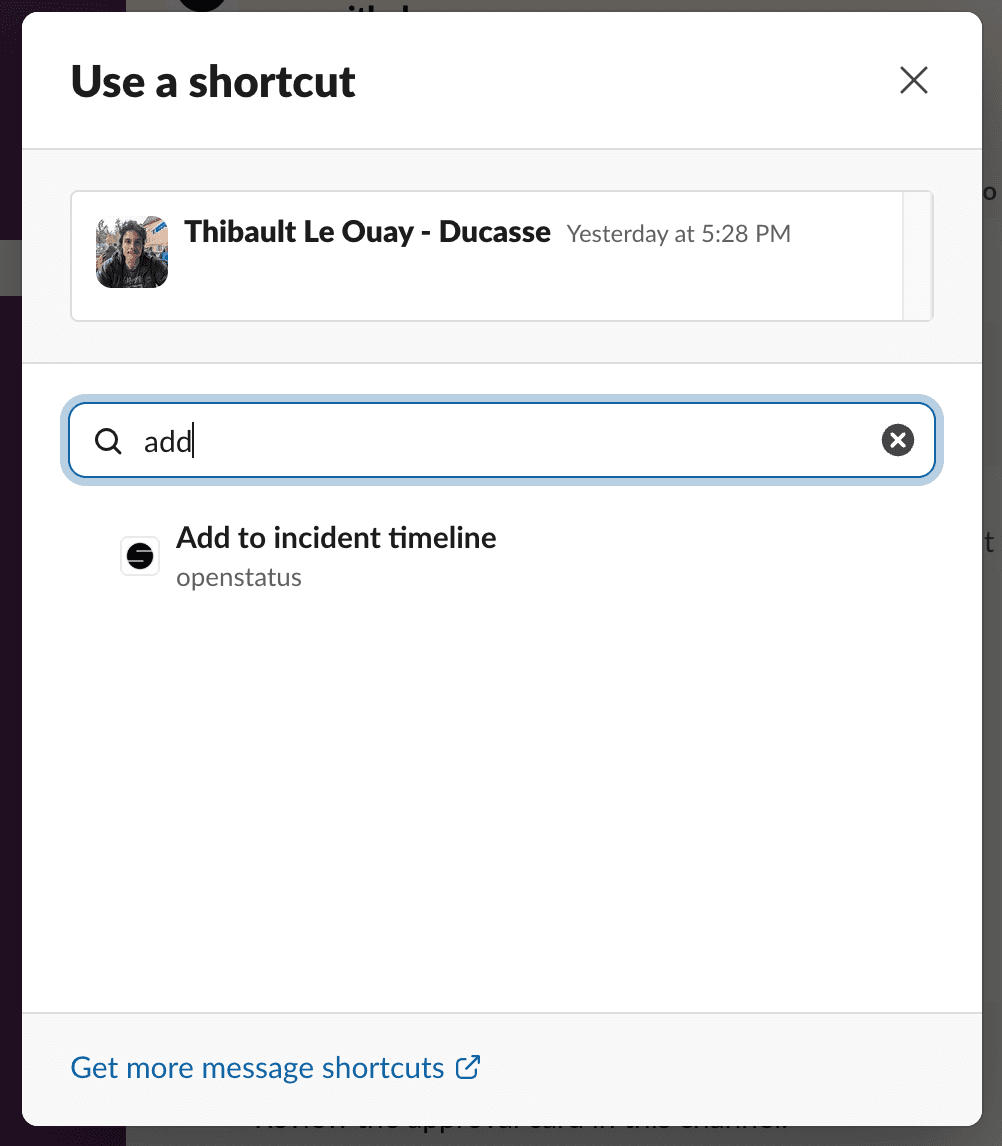
In #inc-2026-10-14-gcp-queue, if someone posts "Edge config deploy at 09:38 changed EU routing, rolling back", you have two ways to save it:
- React with 📌 (
:pushpin:) on the message. - Right-click the message (or click
⋯) and pick Add to incident timeline from the app shortcuts.
Either way, the bot replies with ✅ and appends the message to the incident timeline with its original timestamp, the author, and a permalink back to Slack.
A real dashboard (not just a Slack bot)
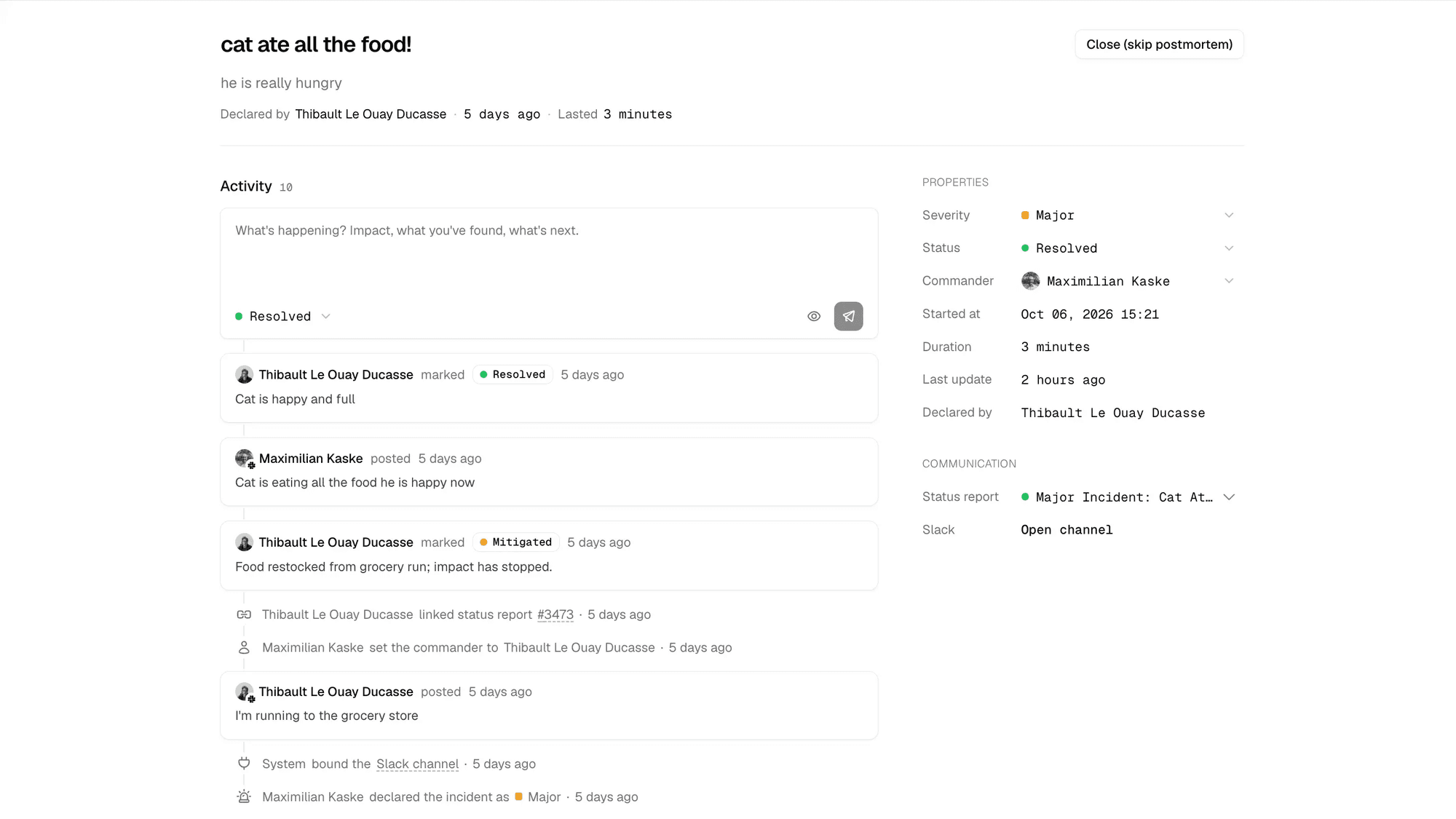
Slack is where the firefighting happens, but we also built a dedicated incident view in the dashboard.
If Slack is down, or if your team doesn't live in Slack all day, you can run the entire incident from the dashboard: declare it, assign a commander, add timeline notes, link a status report, and edit the post-mortem. Everything stays in sync between the two.
We also added stale incident nudges. We all fix the bug, go get coffee, and leave the incident open for a week. If an incident stays open or mitigated with no activity, the bot nudges the channel (after 1h for critical, 4h for major, 24h for minor, with exponential backoff so it doesn't spam you).
Status pages are politics
From the incident channel, you can update your public status page using @openstatus.
Crucially: declaring an incident does not touch your public status page.
We wrote a whole post on why status pages are politics. Status pages are 50% engineering and 50% politics 😂. Not every internal fire belongs on your public page. If a background queue lags for six minutes and no user notices, auto-publishing an outage just creates support tickets for nothing.
So we kept the two objects separate in the data model:
- Incident (internal):
open→mitigated→resolved. Has a severity, a commander, internal notes, and a post-mortem. - Status report (public):
investigating→monitoring→resolved. What customers actually read.
You can link them, and each keeps its own state. You can mark the incident mitigated internally while the public status page still says monitoring. Or you can never publish a status report at all.
When you do want to post publicly, just mention the bot in the incident channel:
@openstatus update the status page: we identified a backlog in the EU job queue and are scaling workers now.
It posts an approval card in Slack. Nothing goes public until a human clicks Approve.
Post-mortems without the manual labor
When the incident is resolved, run /openstatus incident postmortem (or click Draft in the dashboard).
It pulls the incident metadata, the pinned timeline notes, the public status updates, and the Slack channel history (including thread replies, with bot messages stripped out), and generates a post-mortem draft.
Look, it's still AI. I'm not going to promise you zero LLM slop—we're doing our best with the prompt, and we explicitly tell the model to say what's unknown instead of inventing a fake root cause when the channel lacks context. It won't win a Pulitzer, but it gives you a clean first draft in seconds so you're not staring at a blank Notion page on Friday afternoon:
## Summary
Between 10:14 UTC and 10:42 UTC, the GCP task queue experienced a spike in backlog depth, delaying webhook deliveries in EU.

## Impact
- **Duration:** 28 minutes (10:14 UTC – 10:42 UTC)
- **User impact:** Up to 12-minute delay on outgoing webhooks; 0 events dropped.

## Timeline
2026-10-14
- 10:14 UTC - Monitor alert triggered for `gcp-queue-depth-eu`
- 10:16 UTC - Incident declared by Thibault (major)
- 10:21 UTC - Identified stuck worker pool after v2.14.2 deploy
- 10:31 UTC - Rolled back worker image (mitigated)
- 10:42 UTC - Queue depth back to normal (resolved)

## Root cause
Connection leak in `v2.14.2` exhausted the worker Redis pool under burst load.

## What went well
- Alerting fired within 2 minutes.
- Dead-letter queue retries prevented dropped webhooks.

## What went wrong
- Staging tests didn't catch the connection pool limit.

## Action items
- [ ] Add Redis pool exhaustion alert (@thibault)
- [ ] Cap max concurrent jobs per worker (@max)
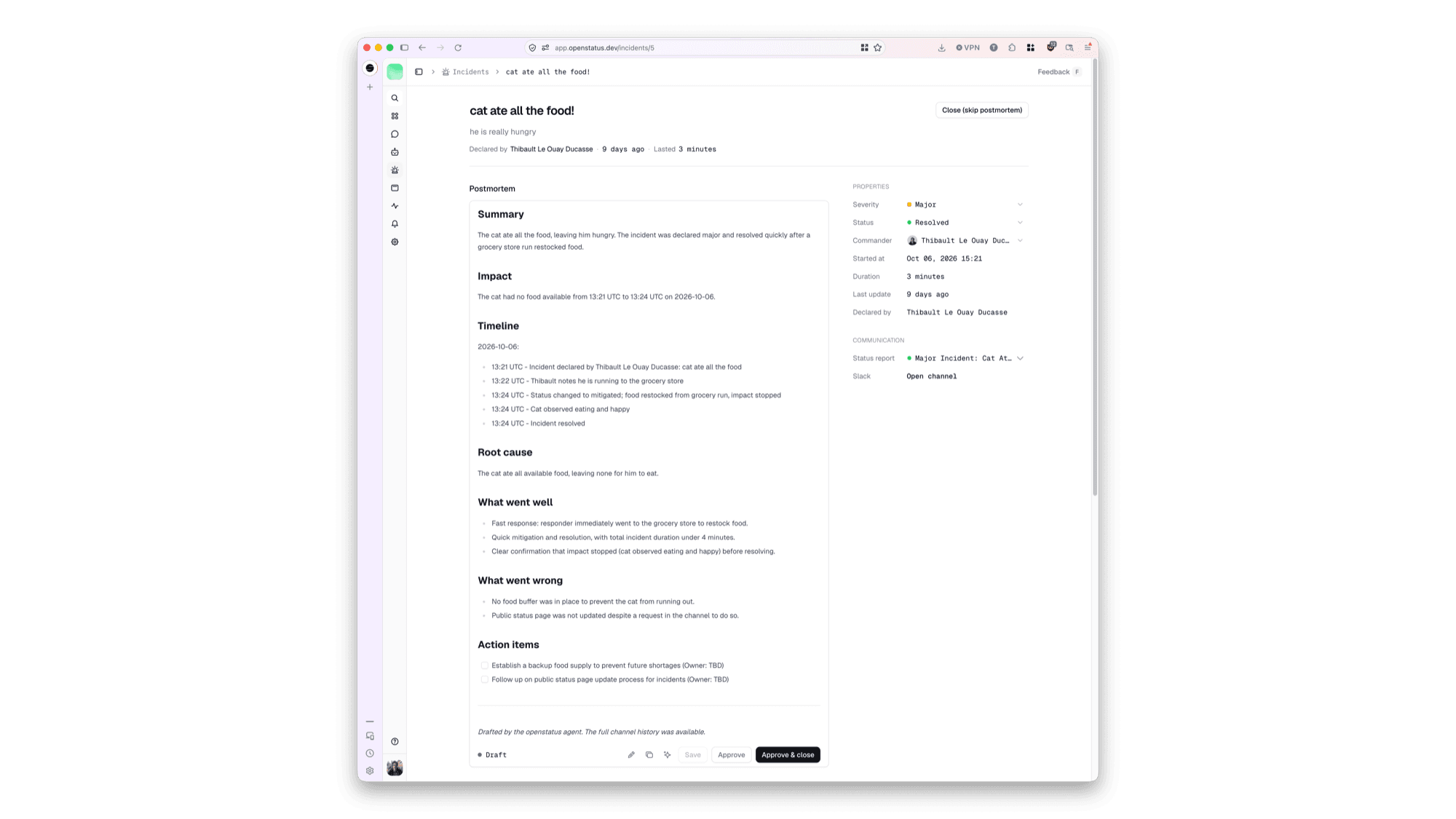
You edit the markdown, fix whatever the LLM got wrong, approve it, and close the incident. Closing freezes the record and archives the Slack channel.
And because every change (declaring, status changes, notes, post-mortem approval) writes to our audit log with the user behind it, you have a clean paper trail ready whenever an enterprise customer or auditor asks for it.
What's next?
We're trying hard not to bloat this. No 12-layer escalation trees. No enterprise workflows for 500-person orgs.
Here's what we're shipping next for incident management:
- API, MCP, and agent workflows: Expose incident management across our API, CLI, and MCP server so your own agents and webhooks can declare incidents, add notes, and draft post-mortems.
It’s live today and included in all current openstatus plans at no extra charge.
Try it out on your next incident (or fire a test one right now) and tell us what breaks.